Every video has a script.
Grab it.
ScriptGrab turns a video link into the exact words spoken — with timestamps, ready to copy, edit and reuse.
Other free tools
One extractor, four platforms
Same tool, same TXT / SRT / VTT downloads — pick the platform you need today.
How it works
Three steps, no account
Link in, script out. Under a minute.
01
Copy the link
Tap share, copy link. Any public TikTok, Reel, Facebook or YouTube video.
02
Paste it above
Drop it in the box and hit Grab. No account, no card.
03
Take the script
Read it here, copy it, or download TXT / SRT / VTT.
The result
What do you get back?
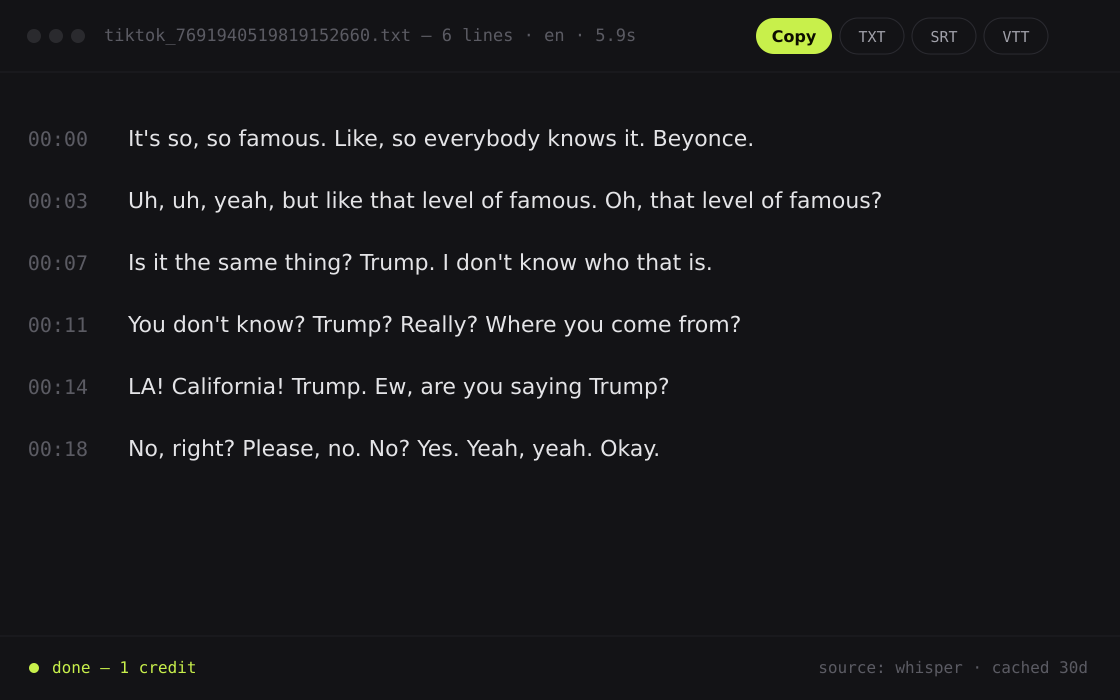
A grabbed script is the full text of every word spoken in the video — clean, timestamped and ready to work with, not a wall of auto-captions.
01
Every word, timestamped
Jump straight to the hook, the payoff, or the one line you came for.
02
Original language kept
A Spanish or Japanese hook comes back usable, not translated.
03
Ready for your editor
TXT to read and rewrite. SRT or VTT drops into Premiere, CapCut or DaVinci.
Features
Built for short-form, end to end
Small tool, no bloat. Everything here exists to get you the words faster.
01
Short-form first
TikTok, Reels and Shorts are first-class — not bolted onto a YouTube downloader.
02
Accurate transcription
Tuned for fast, messy, accent-heavy speech — the way people actually talk on camera.
03
Full text or timeline
Flip between a clean transcript and a line-by-line timed view.
04
TXT, SRT and VTT
Plain text to read, real subtitle files for Premiere, CapCut and DaVinci.
05
One-click copy
The whole script lands on your clipboard.
06
Cached repeats
Grab the same video twice, pay once. Cached results come back instantly.
Why try it
No account, no card
Free accounts get 5 credits every week, and YouTube captions are 100% free forever. Need more? Subscriptions start at $10/month — repeat extractions within 30 days are free.
Free to try
0
credits to start
No signup
0
forms to fill in
Platforms
4
supported sources
Formats
3
TXT, SRT and VTT
Loved by creators
What creators say
Straight from people using it every week.
I used to replay a viral hook twenty times to get the wording right. Now I paste the link and read it.
Maya
Short-form creator
The SRT export alone is worth it. Captions go straight into my editor and I keep working.
Dev
Content marketer
I break clips down for students. Timestamped scripts in the original language make it a five-minute job.
Ana
Language educator
FAQ
Questions
What people ask before they paste their first link.
Which platforms work?
TikTok, Instagram (Reels and feed video), Facebook and YouTube. Paste any public link from those 4 platforms and the transcript comes back the same way. Private or deleted posts cannot be fetched — see the TikTok Help Center for how private posts work.
Why did a video fail?
Private posts, region blocks, deleted clips and age-gated content cannot be fetched. Music-only videos have no speech to read. You get a clear error instead of a blank result.
Is YouTube really free?
Yes. According to YouTube Help, videos can ship with a caption track, and we read that track directly at no cost. For TikTok, Instagram and Facebook we extract the caption text from platform data — 1 credit per video. Videos without captions will be covered by AI transcription (coming soon).
How are credits counted?
Caption extraction costs 1 credit per video (YouTube caption extraction is always free), and a failed extraction never spends one. Repeats of the same video within 30 days are free. One credit covers TXT, SRT and VTT. Subscription quota refreshes every week, and unused credits do not roll over. AI transcription for caption-less videos is coming soon, priced separately per video.
Lite or Pro — which should I pick?
If you publish every week, Lite is enough: 250 scripts every week for $10/month ($79/year). For daily publishing or agency workflows, Pro gives 1,250 scripts every week for $25/month ($199/year). You can switch plans anytime.
What do the downloads do?
TXT is the plain script for reading and rewriting. SRT and VTT are subtitle files with timestamps, ready for Premiere, CapCut or DaVinci Resolve — VTT is a W3C standard and SRT (SubRip) is the oldest widely supported subtitle format.
Can I reuse a script?
Use it as a reference or rewrite it in your own words — but do not pass someone else's script off as your own.